

How to Unpin Someone on Snapchat: Complete Guide for 2026
Snapchat’s pinning feature keeps your favorite conversations at the top. But what happens when priorities shift? Maybe that group chat went silent or you’ve moved on from certain connections. Unpinning someone is simple, private, and takes seconds.
This guide shows you exactly how to unpin someone on Snapchat, whether you’re using iPhone or Android, plus answers every question about privacy and limits.
What Does Pinning Someone on Snapchat Mean
Pinning conversations on Snapchat locks specific chats at the top of your message list. Think of it like bookmarking your most important contacts. The pinned chat stays put regardless of new messages from others.
Snapchat introduced this feature to help users organize their increasingly crowded inboxes. You’ll recognize pinned chats by the small pin icon next to the contact name. Unlike your best friends list, which Snapchat generates automatically based on interaction frequency, pins are entirely your choice.
People pin conversations for various reasons. Some keep their significant other at the top. Others pin work colleagues during projects. Group chats planning events often get pinned temporarily. The flexibility makes it incredibly useful for managing your social circle effectively.
Reasons to Unpin Someone on Snapchat
Life changes constantly. The person you messaged daily last month might barely cross your mind now. Here are common reasons people search for how to unpin someone on Snapchat:
- Relationship Changes: Breakups happen. Friendships fade. Unpinning reflects your current social reality without drama.
- Decluttering Your Chat List: Too many pins defeat the purpose. If everything’s important, nothing stands out.
- Making Room for New Priorities: With a three-pin limit, new connections mean old ones must go.
- Privacy Protection: When someone glances at your screen, pinned chats are visible immediately. Unpinning adds discretion.
Temporary Pins Served Their Purpose: That weekend trip group chat? Event’s over. Time to unpin.
| Situation | Action Needed |
| Active daily contact | Keep pinned |
| Weekly communication | Consider unpinning |
| Monthly or less | Definitely unpin |
| Ended relationship | Remove immediately |
Step-by-Step Guide to Unpin Someone on Snapchat
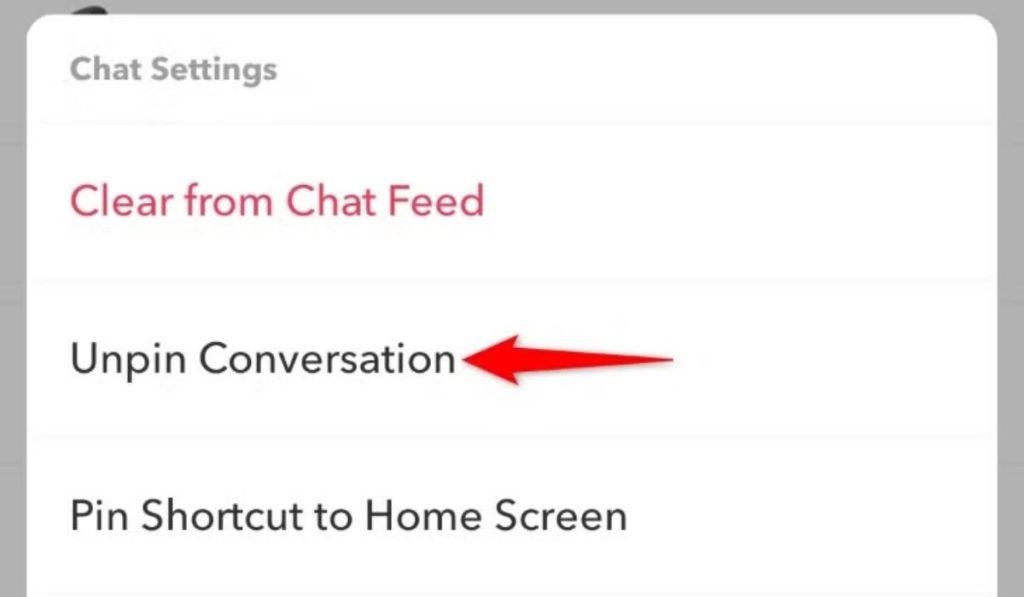
Unpinning takes less than five seconds. The process works similarly across devices with minor interface differences.
How to Unpin Someone on iPhone
iOS users follow these steps:
- Open your Snapchat app completely
- Tap the chat bubble icon bottom-left
- Locate the pinned conversation clearly
- Press and hold the chat name
- Select “Chat Settings” from the menu
- Tap “Unpin Conversation” option
- The pin icon disappears instantly
Your chat moves back to chronological order based on recent activity. No confirmation message appears because the action is reversible anytime.
How to Unpin Someone on Android
Android device steps mirror iPhone closely:
- Launch Snapchat on your phone
- Navigate to your chats section
- Find the conversation you pinned
- Long-press the specific chat thread
- Choose “Chat Settings” when prompted
- Select “Unpin Conversation” clearly displayed
- Verify the pin vanished successfully
Samsung, Google Pixel, and other Android variations use identical steps. The interface might look slightly different visually, but functionality remains consistent.
How to Replace a Pinned Best Friend
Sometimes you want to swap rather than simply remove. Here’s the efficient method:
- Find the new contact deserving a pin
- Long-press their chat name directly
- Tap “Pin Conversation” immediately
- If you’ve hit the limit, Snapchat automatically unpins your oldest pinned chat
- Your new pin appears at top
This method saves time versus manually unpinning first. Strategic replacements keep your most relevant contacts accessible without extra steps.
Can Someone Know If You Unpin Them on Snapchat
Short answer: No. Snapchat never notifies anyone when you unpin them.
Privacy Concerns About Unpinning
Pinning is a completely private organizational tool. Only you see which conversations you’ve pinned. Snapchat doesn’t broadcast this information anywhere in the app.
No notification gets sent. Nothing appears in activity feeds. Friends can’t see who you’ve pinned or unpinned ever. Your organizational choices remain invisible to everyone except you.
The only way someone might notice involves physical scenarios. If they’re looking at your screen during a video call or you hand them your phone, they could see your pinned chats. But that’s device access, not Snapchat revealing information.
Does Unpinning Affect Friendship Status
Unpinning changes absolutely nothing about your Snapchat relationship metrics. Your best friends list stays identical. Those friendship emojis beside names remain unchanged. Snap scores continue calculating normally.
Snapchat’s algorithm determines best friends based on actual messaging frequency and snap exchanges. Pinning is purely cosmetic organization. Think of it like rearranging your desk versus actually changing your job responsibilities.
Snapchat Pin Limit: How Many Friends Can You Pin
Maximum Pinned Chats Allowed
Snapchat limits you to three pinned conversations maximum. This includes individual chats and group messages combined. No premium subscription increases this number.
When you attempt pinning a fourth conversation, Snapchat displays an error message. You must unpin an existing chat before adding another to your top three.
Tips to Rotate Your Pinned Friends
Smart users rotate pins based on current needs:
Time-Based Rotation:
- Weekdays: work or school contacts
- Weekends: close friends and family
- Events: temporary group chats
Priority System:
- Pin active conversations requiring quick responses
- Rotate weekly based on interaction patterns
- Unpin anyone you haven’t messaged in three days
Strategic Approach:
- Monday morning: review and refresh your pins
- Keep one slot for emergencies or new priorities
- Don’t let pins become stale and outdated
Common Problems While Unpinning Someone on Snapchat
Unpin Option Not Showing
Can’t find the unpin button? Try these solutions:
- Update Your App: Outdated versions cause missing features. Visit your app store and install the latest Snapchat version immediately.
- Clear Cache: Go to Settings, scroll to “Clear Cache,” and tap it. Restart Snapchat completely afterward.
- Verify It’s Actually Pinned: Look for the pin icon. Sometimes users forget which chats they pinned originally.
How to Fix Snapchat Pin/Unpin Issues
When problems persist despite updating:
- Force close Snapchat completely
- Check your internet connection stability
- Log out and log back in
- Reinstall the app if necessary
- Contact Snapchat Support through app settings
Most glitches resolve with a simple app restart. Persistent issues often indicate broader app problems requiring official support intervention.
Tips to Manage Pinned Chats on Snapchat
Best Ways to Organize Your Conversations
Effective pin management improves your entire Snapchat experience:
- Weekly Audit System: Every Sunday evening, review your three pins. Ask yourself: “Did I message this person this week?” If not, consider unpinning.
- Communication Frequency Rule: Pin only contacts you message daily. Everyone else can wait in chronological order.
- Event-Based Pinning: Planning something? Pin that group chat. Event finished? Unpin immediately.
- The 48-Hour Test: If you haven’t opened a pinned chat in two days, it probably doesn’t deserve that prime spot anymore.
Additional organization strategies:
- Archive old conversations regularly for cleanliness
- Mute less important chats instead of pinning
- Use descriptive group chat names for easy identification
- Combine pinning with Do Not Disturb for better control
| Pin Slot | Best Use |
| Slot 1 | Most frequent daily contact |
| Slot 2 | Important ongoing conversation |
| Slot 3 | Rotating based on current needs |
Bottom Line
Learning how to unpin someone on Snapchat takes seconds but improves your messaging experience significantly. The process is identical on iPhone and Android: long-press, chat settings, unpin. Nobody gets notified when you unpin them, so privacy concerns are nonexistent.
With only three pins available, strategic rotation keeps your most important conversations accessible. Regular audits ensure your pins reflect current priorities rather than outdated connections. Don’t hesitate to unpin when relationships shift naturally.


